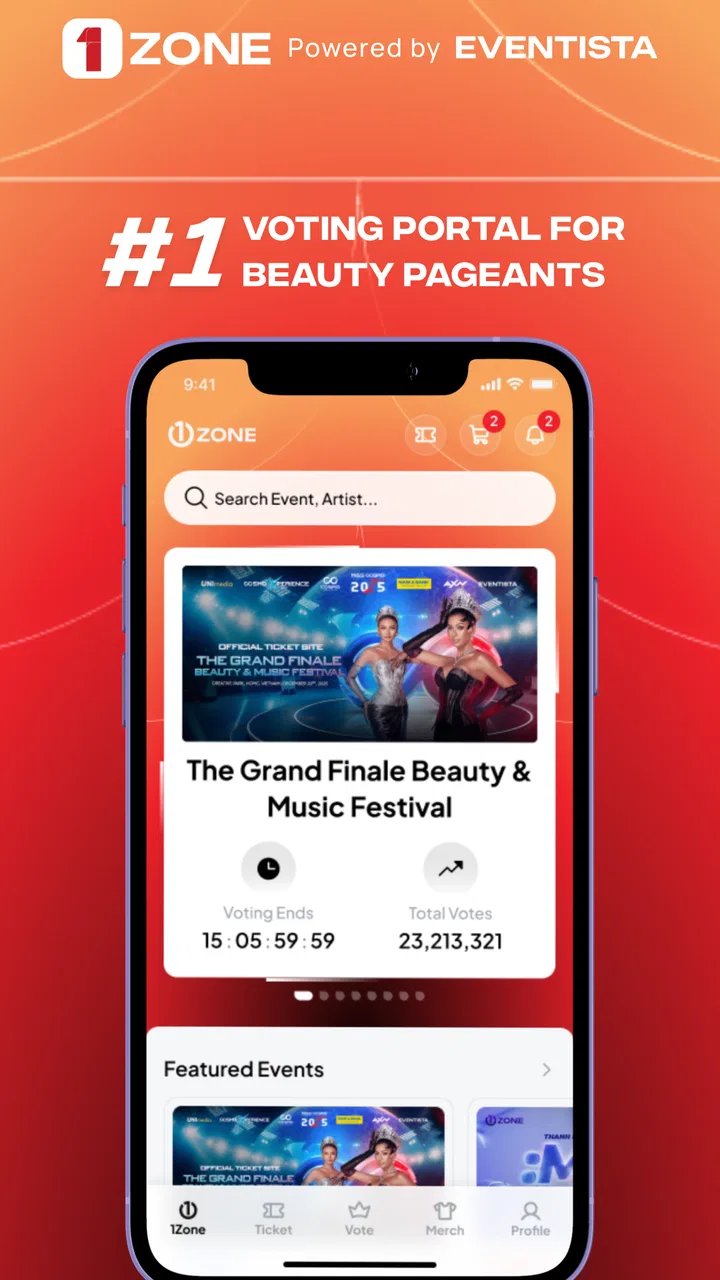
1Zone
- 3.2
- Rating
- 500.00K
- Installs
- Free
- Price

 Analysis by App-foxy
When I first opened 1Zone, I expected a simple entertainment companion rather than a full media platform. That expectation turned out to be useful: this is an app built around fan engagement, so its value depends less on endless content and more on how well it helps you take part in an entertainment experience. If you are trying it for the first time, the best approach is to treat it as a place to connect with the activity around a show, event, or fan community, not as a replacement for your usual streaming, social, or messaging apps.
That distinction matters because the store summary is brief, while the app itself makes more sense when you think about the moment in which you would use it. You might open it before an entertainment event to see what is available, during a quiet break to follow the surrounding fan activity, or afterward when you want to stay engaged instead of closing the experience completely. I found that this mindset made the app easier to understand than judging it as a conventional video or social network.
1Zone is a free entertainment app from Eventista, with an Everyone age rating. It has passed the half-million-install mark and holds an average rating of 3.2 from roughly seven hundred ratings, so the public response is mixed rather than universally enthusiastic. I would read that as a reason to keep expectations practical: there is a clear audience for the concept, but the experience may feel more useful in the right context than as an app you open every day without a specific reason.
You May Also Like
 Google Keep - Notes and lists
Google Keep’s Quiet Growth Shows the Appeal of Simpler Notes
As mobile work gets busier, Google Keep keeps winning a simple contest: capture a thought quickly, find it later, and get on with the day.

 Blood Strike: 2.5 Anniversary
Blood Strike’s Loadouts Turn Every Drop Into a Tactical Gamble
A close look at Blood Strike’s custom loadouts: how fast access to signature weapons reshapes its battle royale rhythm, rewards preparation, and narrows the gap between fights.

 Pandora - Music & Podcasts
Pandora’s Music Is Easy to Start, but Harder to Recover
Pandora’s strength is its low-effort path from a seed to a station. Its weak spot is how much confidence it asks you to place in connection, setup, and quiet recovery.

 8 Ball Pool
8 Ball Pool Is Built on Rivalries, Rematches, and Routine
A close look at the rivalries, rematches, shared routines, and unanswered safety questions that turn a quick pool match into a persistent mobile community.

 Samsung Music
Samsung Music’s Quiet Strength Is Playing What You Already Own
Its reach comes less from spectacle than from dependable access to a personal library. That simplicity is both the app’s strongest retention engine and its ceiling.

 AccuWeather: Weather Radar
AccuWeather Review: A Quick, Clear Forecast for Everyday Decisions
For everyday plans, the best forecast is the one you can understand quickly. AccuWeather makes rain timing, radar, and local conditions easy to act on, with a few trade-offs.
More From Our News Desk



What to expect before you start using 1Zone
The first thing to understand is that this is a focused fan-engagement tool. It is not the kind of entertainment app where you install it and immediately receive a large library of unrelated videos, music, or games. The experience is more situational. Its usefulness comes from what is happening around the entertainment content or event you care about, which means your first impression may depend on whether there is an active reason for you to be there.
That can be a strength. A focused app can avoid the noisy home screen found in broad social platforms, where fan conversations compete with news, advertisements, recommendations, and unrelated posts. With 1Zone, I would approach the opening screen as a starting point for participation. Look for the area connected to your interest, read the available prompts carefully, and avoid assuming that every part of the app is designed for passive browsing.
It is also worth knowing what this focus means for different users. If you enjoy being involved around entertainment rather than only watching from a distance, the concept should feel natural. If you want a polished catalog of films, series, songs, or live broadcasts, a dedicated streaming or media app will probably serve you better. If your main goal is broad discussion with people from many unrelated communities, a general social network may offer more activity.
My advice is to install it when you have a concrete reason to use it. For example, imagine that you are preparing for an entertainment event and want one place to check the fan-facing experience instead of jumping between a browser, a social feed, and a group chat. That is the kind of situation in which a specialized app can be more convenient than a general alternative, even if it has fewer things to explore.
Getting through the first setup without overthinking it
The current version is 2.6.1, and the app supports devices running Android 7.0 or later. That makes it accessible to people using older Android hardware, although actual comfort will still depend on the phone’s screen, speed, and available storage. I would begin by installing it on the device you normally use for entertainment, because switching between devices during an event can make a focused app feel more complicated than it is.
Once it opens, take a moment to identify the main path instead of tapping every visible option. A first-time user usually needs to answer three practical questions: what am I here to follow, where do I see the related activity, and what action can I take next? If the app presents a selection or an event-related area, choose the option that matches your immediate interest rather than trying to configure everything at once.
This is one of the small but important ways to reduce friction. Fan apps can feel empty when they are opened without a clear focus, and users sometimes mistake that for a technical problem. Before deciding that the app has little to offer, check whether you have entered the relevant area or selected the subject you came to see. In my experience, a focused entertainment tool often becomes clearer after that first deliberate choice.
I would also keep notifications under control from the beginning. If the app offers notification choices during setup, select only the updates that support the way you plan to use it. Someone following a live entertainment moment may appreciate timely prompts, while someone checking in occasionally may find frequent alerts distracting. The right setting is not necessarily the most active one; it is the one that brings you back when you actually want to participate.
Another useful habit is to complete setup when you have a few uninterrupted minutes. Do not install it moments before an event and expect to learn every screen under pressure. Open the app early, identify the relevant destination, and make sure you understand how to return to it. That preparation turns the first meaningful session into a calmer experience and leaves you free to pay attention to the entertainment itself.
The first meaningful action is more important than browsing
For me, the first successful action in an app like this is not simply opening a page. It is reaching the fan-engagement area that matches my reason for installing it and doing something there that confirms the app is useful. That might mean joining the relevant experience, responding to an available interaction, or following the path presented for the entertainment activity in front of me. The exact action will depend on what is active, but the principle is consistent: move from discovery to participation.
A practical first-session routine is simple. Open 1Zone, identify the entertainment subject you care about, enter its dedicated area, and look for the clearest available interaction. Read the wording before selecting anything, especially if several buttons look similar. After completing that action, return to the main area and check whether the app reflects your participation or offers a related next step. This gives you a better understanding of the app than scrolling through every screen.
That workflow also helps answer a question many first-time users have: what counts as success? Success is not necessarily spending a long time inside the app. It is knowing where to go the next time you want to engage. If you can close the app and later return directly to the relevant area without guessing, you have already removed much of the initial learning curve.
Consider a realistic evening scenario. You are at home before an entertainment event, with the main broadcast or content available through your usual service. Instead of expecting 1Zone to replace that service, you open it to take part in the surrounding fan experience. You identify the event-related section, complete the available interaction, and keep the app nearby for the moments when you want to engage. The usual streaming app remains responsible for watching; 1Zone serves the participation layer.
That division of roles is one of the app’s most useful ideas. It prevents the common disappointment of expecting one entertainment product to do everything. I would use a streaming service for playback, a messaging app for private conversation, and 1Zone for the fan-facing activity it is designed to support. The trade-off is that you may need more than one app, but each tool can remain clearer and less cluttered.
Where new users may become confused
The biggest possible source of confusion is the difference between entertainment content and entertainment engagement. If you open the app expecting a large collection of things to watch, you may wonder why the experience feels narrower than a streaming platform. That is not necessarily a missing feature; it is a sign that you are evaluating it by the wrong standard. The app’s purpose is closer to participating around entertainment than replacing the entertainment source itself.
A second point of friction is timing. A fan-engagement app can feel more active when there is a current event or a clear subject to follow. When you open it without knowing what you want to engage with, the app may seem less immediately useful. I recommend deciding what brought you there before launching it. Even a simple goal such as “I want to check the fan activity around this event” is enough to give the session direction.
You may also wonder whether you should use it as your main social space. I would not. General social platforms are better for maintaining broad conversations, private groups, and long-running personal connections. 1Zone makes more sense when the entertainment context is the center of attention. Its specialization can make a relevant session feel more focused, but it also means it is not the best choice for every kind of conversation.
Another realistic question is whether the app is suitable for younger users. Its content rating is Everyone, which makes it broadly approachable from an age-rating perspective. I would still apply ordinary common sense when using any app connected with public fan activity: review what is visible, use the controls available to you, and decide whether the interaction fits your own comfort level. The rating is reassuring, but it does not remove the need for personal judgement.
Performance expectations should also stay grounded. The app supports an older Android baseline, which is helpful for compatibility, but support for an operating-system version does not guarantee the same smoothness on every phone. If your device is older, close unnecessary apps before an important session and give the interface time to load rather than repeatedly tapping the same control. That is a small habit, but it can prevent accidental duplicate actions and reduce frustration.
Three ways to get more value from a focused fan app
First, use 1Zone as a companion rather than a destination you must constantly monitor. Open it at a meaningful point in your entertainment routine, complete the interaction you came for, and return when there is a reason to check again. This approach avoids turning a specialized tool into another endless feed and makes its focused design work in your favor.
Second, separate discovery from participation. During the first session, explore enough to learn where the relevant area lives. After that, stop browsing and use the shortest route to the action you value. This is especially useful before a live or time-sensitive moment, when searching through menus can distract you from the event. A small amount of early orientation can save repeated confusion later.
Third, compare its convenience with the number of apps it replaces for your specific routine. If it lets you avoid switching between several fan pages or scattered event-related spaces, it may earn a permanent place on your phone. If you still need another app for every meaningful part of the experience and rarely return to 1Zone itself, the extra step may not be worthwhile. That is a fair trade-off to evaluate after a few purposeful sessions.
I also think the public rating deserves a balanced reading. An average of 3.2 is neither a warning to avoid the app automatically nor proof that it will suit everyone. It suggests that the experience has a real audience but may include friction depending on expectations, device, and timing. The roughly seven hundred ratings provide enough public feedback to show that reactions vary, so I would judge it against your intended use rather than treating the number as a final verdict.
Who should install it, and who should choose something else
I would recommend trying 1Zone if you enjoy being involved in the atmosphere around entertainment and have a specific event, community, or fan activity in mind. It is also worth considering if you prefer a dedicated space over a crowded social feed. The free price removes the financial barrier to testing that fit, and the Everyone rating makes it an easy app to consider for a broad household audience.
I would be more cautious if you want an all-purpose entertainment hub. For watching films or series, listening to music, or finding a large range of unrelated content, specialized media services are likely to be more satisfying. I would also skip it if you mainly want private one-to-one conversation, because a messaging app is a more direct tool for that job. The same applies if you have no current entertainment interest to follow; without that anchor, the app may not give you a strong reason to return.
Eventista has chosen a narrower direction, and that creates both the app’s identity and its limits. A broad competitor can offer more content and more social activity, while 1Zone can feel more relevant when its engagement layer matches the moment you are in. The better option depends on whether you value concentration or variety. I prefer the focused approach when I already know what I want to follow, but I would not use it as my only entertainment application.
My next-step recommendation after the first session
After you complete your first meaningful action, do not immediately judge the app by how long you stayed inside it. Instead, ask whether it made the fan experience easier to follow, more interactive, or less scattered. If the answer is yes, keep it installed and return during the next relevant entertainment moment. If the answer is no, compare the same routine with your existing streaming, social, or messaging tools and decide whether 1Zone adds enough value to justify another step.
For me, the app works best when I give it a defined role: it is the place for fan engagement, while other apps handle viewing and private conversation. That role is clear enough to be useful, but narrow enough that it will not suit every user. The free installation makes experimentation reasonable, and the current 2.6.1 release supports a wide range of older Android devices, but the real test is whether your own entertainment habits provide a reason to return.
My honest recommendation is to try 1Zone with one specific entertainment goal, not as an open-ended replacement for every app on your phone. Follow the setup calmly, find the relevant fan area, complete one interaction, and then decide from that experience. If you like participating around entertainment as much as consuming it, this specialized approach may fit you well. If you only want content on demand or broad social conversation, your usual alternatives will probably remain the better choice.
FAQs for 1Zone
01What is 1Zone and what can I use it for?
1Zone is an entertainment and content-focused application whose exact features may vary depending on the version, region, and platform you install. Before downloading, users should review the app-store description carefully to confirm whether it provides streaming, media access, community features, or another service. During testing, the most important first step was exploring its categories, navigation, account options, and available content to understand what the app actually offers.
02Is 1Zone free to download and use?
The availability and cost of 1Zone can depend on the store listing and your location. An app may be free to install while still including advertisements, optional purchases, subscriptions, or premium sections. Check the Google Play or App Store page for current pricing information before installing, and review any payment screen carefully. Do not assume that every feature is included in the free version.
03Is 1Zone safe to install on Android or iPhone?
The safest way to install 1Zone is through an official Google Play or Apple App Store listing, where the developer information, permissions, privacy details, ratings, and update history can be checked. Avoid downloading modified APK files or unofficial copies, since they may contain harmful code or request unnecessary access. After installation, review permissions and deny anything that does not appear essential to the app’s purpose.
04Does 1Zone require an account or an internet connection?
Whether 1Zone requires registration depends on the features you want to use. Basic browsing may sometimes be available without an account, while personalized content, saved preferences, synchronization, or interactive functions may require sign-in. A reliable internet connection is generally recommended for loading online content and keeping the app updated. Users with limited mobile data should also check whether the application downloads media or uses significant background data.
05What should I check before downloading 1Zone?
Before downloading 1Zone, verify that your device meets the listed Android or iOS requirements and that enough storage is available. Read recent user reviews rather than relying only on the overall rating, because comments often reveal issues with crashes, advertisements, login access, or regional availability. It is also worth checking the privacy policy, requested permissions, subscription terms, and the developer’s support information before proceeding.
Pros
- Simple interface makes the main features easy to find.
- Lightweight design works well on many Android devices.
- Useful for users seeking a focused
- no-frills experience.
- Setup is generally quick and requires little technical knowledge.
- Regular use can be convenient for completing routine tasks.
Cons
- Some features may be limited without an account or subscription.
- Performance can vary depending on device and internet connection.
- The app may offer fewer customization options than competitors.
- Permissions should be reviewed carefully before completing setup.
- Support and troubleshooting resources may be limited for some users.

1Zone
Gallery